AT A GLANCE
Problem: Driving lessons are only available by phone during office hours, six location calendars operate in silos, and the learning app does not show a learning path.
My Contribution: Concept for a booking portal, learning app, and campaign, as well as a working prototype of the booking portal, implemented with AI assistance and verified by me.
Result: Rules that are strictly enforced by the server, clear error messages, WCAG 2.2 AA compliance as a baseline, and a pilot plan with measurable goals. Evaluation of the three module exams: 100, 100, and 90%.
A driving school company with six locations and around 2,400 learner drivers per year schedules driving lessons by phone, only during office hours, and across six separate calendars that do not sync with each other. The in-house learning app DriveWords prepares students for the theory test in twelve languages, but lacks a structured learning path. Furthermore, for recruiting driving instructors, there is no online presence that showcases what daily work life actually looks like.
During my continuing education as a UX Engineer for E-Learning and Generative AI, I developed three components for this scenario: a rules-based booking portal, an AI-supported communications campaign, and a new learning concept for DriveWords. In addition, I implemented the booking portal as a functional prototype.
Note: Case study from my continuing education featuring a fictional company scenario. All individuals and appointments in the prototype are fictitious.
Initial Situation
Driving lessons can only be booked by phone and exclusively during office hours. Anyone at school or working shifts cannot reach anyone.
Six location-specific calendars without shared occupancy lead to double bookings, unutilized gaps, and deadhead trips between distant appointments.
Training records are paper-based, making confirmations difficult to verify.
The website, learning app, and course management system do not share a common database.
The goal: a 20% reduction in unproductive driving time and an accessible interface in compliance with WCAG 2.2 AA, also in view of the German Accessibility Strengthening Act (BFSG).

My Role
I worked on the case study alone. My tasks:
Rule and requirement analysis: five dispatching rules from transmission type to daily limit
Architecture and interface design: REST API, roles and permissions, token-based authentication
UX/UI concept with accessible components according to WCAG 2.2
Functional prototype, implemented with AI assistance using Claude Code, reviewed and tested by me
Personas and campaign using generative AI, including source verification
Learning concept and mock-ups for DriveWords in Figma
Real users were not available for the case study. The basis consisted of the company profile, the 2025 JIM study on media usage among adolescents, and specialist literature on web development, educational psychology, and learning experience design. To prevent a false sense of security, I marked every assumption as verified, plausible, or open, and determined for each component how it will be validated in operation.
Three Personas
Lena, 17, high school student: wants her driver's license before graduating, but can only reach the office during class hours.
Tobias, 24, shift-working young professional: needs driving lessons around the edges of his shifts.
Andrea, 46, driving instructor looking for a job: wants predictable days without empty runs and an employer who can prove it.
Key Insight: Available Does Not Mean Bookable
A time slot can be free in the calendar and still not be bookable: because the location only has manual cars, because the following lesson doesn't fit geographically, or because the person has already booked enough driving time for that day. Over the phone, dispatch solves this mentally. Online, the system must know and explain these rules.
DriveWords: Content, but No Learning Path
The starting point of the learning app revealed five gaps:
No visible learning progress
20 questions without interruption
Incorrectly answered questions do not return
Audio without replay, tempo control, or self-recording
External videos without tracked progress
My design goal: reduce extrinsic cognitive load and make it easier to resume after breaks.
Six decisions shape the concept. The first four concern the booking portal, the last two the campaign and learning app.
1. The server decides the rules
What has changed
The calendar now only shows time slots that can be booked according to all rules. Available but unbookable slots state the reason, such as "This driving instructor already has a driving lesson at the same time." The server makes the binding decision: It filters the availability upon retrieval and checks all rules again when booking.
Why this is important
The interface is convenient, but it is not a safety net. Rules cannot be bypassed in the browser, and all roles see the same valid status.


2. Explain conflicts instead of rejecting them
What has changed
If a booking fails, the dialog lists all reasons at once and highlights which ones cannot be overridden. If two people modify the same driving lesson at the same time, the second person receives a clear message instead of a silent overwrite: “This driving lesson has been modified by someone else in the meantime. Please reload and try modifying again.”
Why this is important
Those who understand why something doesn’t work won't try the same thing three times and won't end up calling the office anyway.


3. Each role sees what it needs
What has changed
Learner drivers, driving instructors, and administration work in the same calendar with different permissions. Access control takes effect at the API level, not just in the user interface. The system requires a second factor only for the administration, which has the broadest access. Driving instructors are allowed to override rules on a case-by-case basis, for instance in the week before the test, and every override is logged.
Why this is important
Security where the risk lies, and no extra step for everyone else.


4. Accessibility as a Foundation
What has changed
The core components follow the WCAG 2.2 success criteria: time slots can be selected without dragging and are large enough, labels are located above the fields, help can always be found in the same place, booking confirmations are announced for screen readers, and the focus is visible at all times. An automated test checks the contrasts of all color pairs, and the interface also works in narrow windows.
Why this is important
Accessibility is mandatory here, not optional. And it helps everyone booking on the go using a smartphone.

5. AI as a Tool with an Obligation to Review
What has changed
I developed personas and campaign ideas in dialogue with AI, marking each statement as verified, plausible, or open. For the visual concepts, 16 drafts were created using four tools: ChatGPT, Gemini, Adobe Firefly, and Canva. Recurring errors included incorrect aspect ratios, extra text and invented brands, recognizable faces despite exclusion criteria, and altered wording.
Decision
AI is used for image ideation and variations; final texts, logos, and people are checked manually. The campaign “Book in the evening. Ride on Saturday.” shows real situations instead of promises.


6. A learning path instead of a collection of content
What has changed
DriveWords resumes where you left off and shows what comes next. Terms are heard first, then read and applied in the context of the driving lesson, with repetition, 0.75× speed, and self-recording. Every answer receives immediate feedback with an explanation, mistake topics return sooner, and progress is visible for each chapter.
Deliberately omitted
Streaks and leaderboards. They punish breaks and encourage comparison instead of learning. Badges are only awarded if they are tied to learning objectives.
Why this matters
Anyone learning alongside school or shift work faces constant interruptions. The learning path must accommodate breaks, and every element must contribute to understanding; otherwise, it only adds to the burden.


Since this is a case study, there are no operational data available yet. The result is an actionable concept with clear metrics and a prototype demonstrating that the rules hold up.
Working prototype with over 70 automated tests verifying the concept's promises
Metrics for the pilot: 20% less unproductive driving time. The override rate highlights where a rule misrepresents reality.
DriveWords: Twelve-week trial at one location, measuring re-engagement rates, repeat-attempt resolution rates, and a clear cancellation criterion
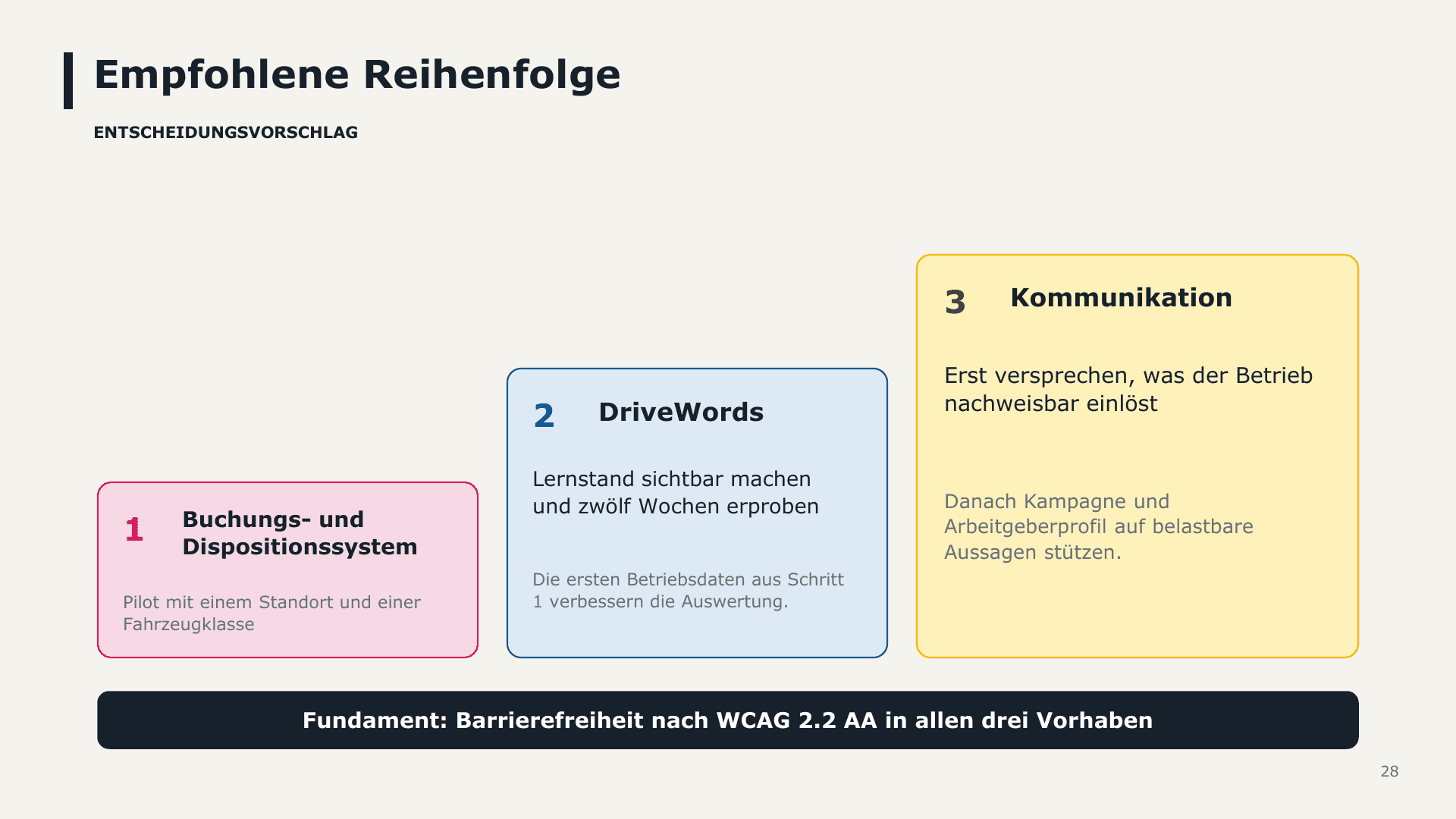
Recommended sequence: first the booking system, as it provides the data against which everything else can be measured, then DriveWords, and finally the campaign. An employer brand profile should only promise what the business actually delivers.
Evaluation in further training: 100% (Web Development), 100% (Generative AI), and 90% (Educational UX)
A functional prototype makes conceptual assumptions verifiable. Only in the prototype did it become apparent how often a time slot is available but cannot be booked, and that the interface needs to explain exactly that. Otherwise, the system seems arbitrary.
AI accelerates implementation enormously, especially during prototyping. However, the responsibility for rules, security, and accessibility remains with me. Every AI output requires a review step—with code just as much as with images and text.
When it comes to learning, less is more. Every element must contribute to understanding; otherwise, it only increases the cognitive load. This applies especially to gamification.
Without real users, personas remain assumptions. The next step is therefore interviews at two locations and a moderated observation for each role before the concept is expanded further.